
I learned how to use Flipboard to increase my blog traffic a few months ago, and it’s a knowledge that goes refined and polished.
As with all social media, really, but in this case, Flipboard is quickly becoming a big part of The Working Line’s success.
At the end of this guide, after I’ve shown you the exact step-by-step I used to start generating more blog traffic from Flipboard, I’ll show you my analytics so you can understand exactly the impact this platform can have for you.
More blog traffic means more income, after all.
And if you’re planning on getting approved for Mediavine and other display ad networks, you need to join Flipboard.
There are many ways to increase blog traffic if you’re interested in seriously blogging, but so far, using the Flipboard platform has brought the most results in terms of social media.
In this guide, I’ll share with you everything from how to use Flipboard for bloggers to get viral blog traffic to analyzing your results and understanding how to attract more visitors on your blog.
The best part?
Flipboard is completely free, and the only payment it requires, really, is time and dedication.
9 Tried-and-Tested Flipboard Hacks to Get Viral Blog Traffic
Flipboard is a platform slash social media which has been around for over a decade, and yet, even if I started my first blog in 2015, I never heard of it.
I guess success nuggets are mostly those you keep for yourself to remain in the blogging competition, isn’t it?
Flipboard works with ‘magazines’ and ‘storyboards’ and if you’re a regular Pinterest user, you will find it to be very similar…
Albeit much easier to use – and when you’re already busy writing new blog posts, promotion is the last thing you really want to do.
I know it’s my case.
Whether you’re here to learn how to post on Flipboard, become a Flipboard publisher, or just use Flipboard on a daily basis to increase your blog traffic, keep reading – all the info is below!
What is the Difference Between Flipboard and Pinterest?

Flipboard and Pinterest both work with magazines or boards that you can fill with other people’s and your content related to the board topic.
That’s one similarity that makes Flipboard easy to use for bloggers who have just joined the platform.
SEO is important for both platforms – you have to use keywords for Pinterest, but you also can (and should) use them in the titles and descriptions of your magazines and storyboards on Flipboard.
If you don’t understand everything just yet, don’t panic.
I’ll show you the exact step-by-step process I have used and my own Flipboard hacks and formulas so you can also attract viral traffic for your blog.
Differences and Similarities Between Pinterest and Flipboard
The main difference between Flipboard and Pinterest is that the former allows for viral traffic much quicker than Pinterest, which usually takes about 8 to 9 months to really push your pins out there.
You cannot schedule posts on Flipboard in the way you would on Pinterest, but you also do not have to write a full-length description for your posts on Flipboard.
In a way, you can gain a lot of time using this platform.
I currently use both Pinterest and Flipboard to get viral posts, but I have to admit that when you only have to post a link on Flipboard and the platform drags the full post from your website by itself…
It’s a little bit of down time you can use to rest or keep building your Flipboard account.
Now let’s see how to use Flipboard for bloggers; by following my process consistently, you should be able to see results in no time!
Flipboard Hacks to Get Viral Blog Traffic: Create Magazines
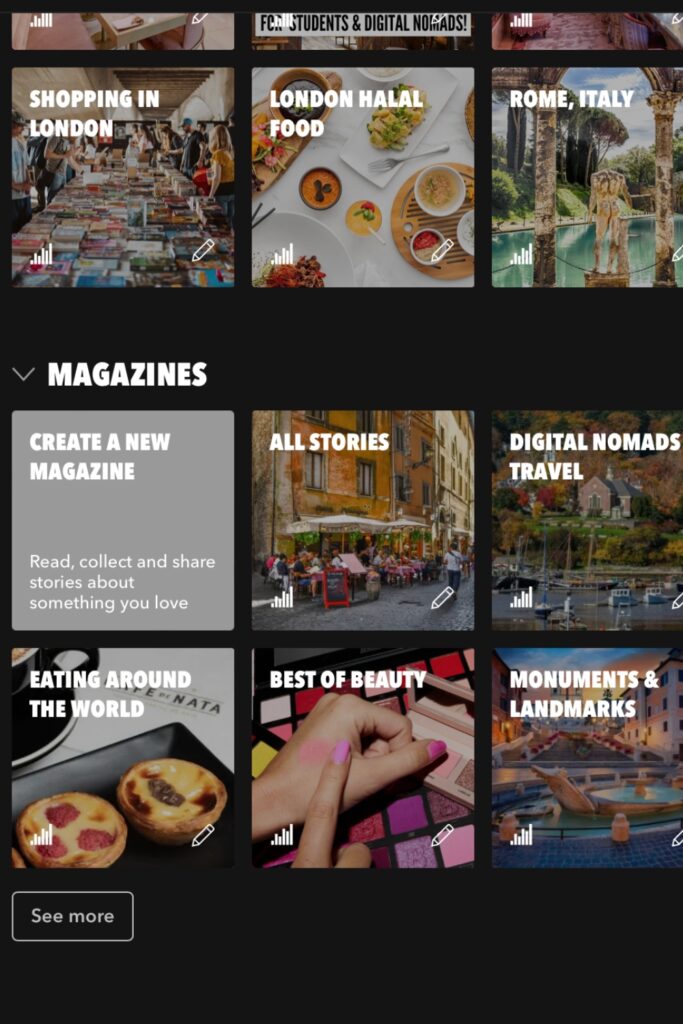
The first thing to do once you’ve joined Flipboard is to add a name, a picture and a description of your account so people who land on your profile know what you’re about.
Then, you have to start creating magazines, in the same way you’d create boards on Pinterest.
What I did when I first started using Flipboard with the thought of attracting blog traffic was to create a dozen of magazines which matched the niches on The Working Line.
Lifestyle, Makeup, Travel, Blogging Tips are all magazines I have on my Flipboard account.
It’s crucial to create magazines that match your topics as you will not only publish (‘Flip’) other people’s content in these magazines, but also yours.
So you’re basically creating a foundation that will later bloom in the shape of more traffic from these very magazines.
Flipboard Hacks to Get Viral Blog Traffic: Follow Magazines

The more magazines you follow on Flipboard, the better for you.
It’s not the same as following too many people on Facebook or Instagram – the more, the better, really.
More magazines mean you always have fresh content to flip, and since Flipboard works according to the ‘freshness’ of articles published online, it’s very, very important.
Flipboard Hacks to Get Viral Blog Traffic: Flip, Flip, Flip Some More
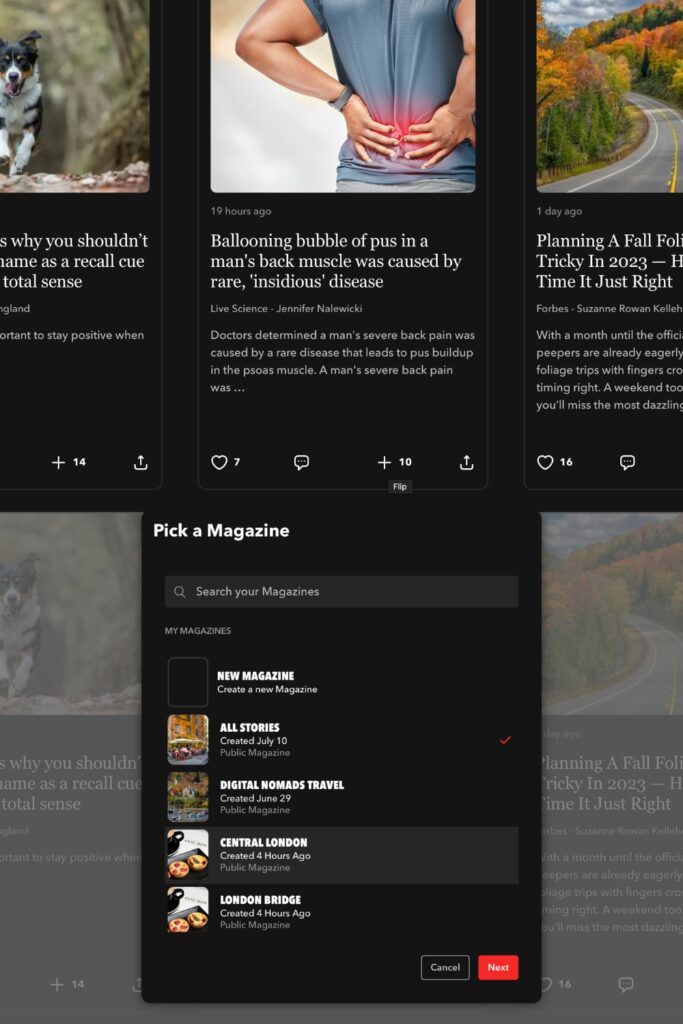
Once you have created your magazines (don’t forget keywords in the descriptions!) and followed other magazines and people, the time has come to flip.
Flip abundantly.
Flip as much as you can.
Stick to the topic of your magazines as much as possible.
You can flip articles on the Flipboard app, or on the website and your favorite way really depends on you.
Sometimes, I’ll flip on my phone because it’s easier on days I don’t feel productive with work but still want to do a little something.
Sometimes, flipping on the Flipboard website just feels easier and more productive.
Flipboard really is a social media platform in the way that you have to give before you can take (or be given).
Like karma, isn’t it?
You’d think that what goes around comes around, but we often conveniently forget that for the good to reach us, we need to do good first.
That’s why you need to flip coherent stories into your magazines as a foundation before you start flipping your own.
And you know why?
Because people can follow you, can follow your magazines, and can follow your storyboards (your own collections of stories – only accessible when you’re a Flipboard publisher).
If you only have one story flipped in your magazine and not even one follower, you’ll have much less traffic generated when you post your own link.
On the other hand, if you’re patient with your blog publishing schedule and take the time to flip consistently before you even publish your own story from your own blog, you will see results much faster.
Flipboard Hacks to Get Viral Blog Traffic: Write, Write, Write!

Once the wheels are in motion, when you have done your homework of flipping your first stories, now’s the time to write.
Any blog niche works on Flipboard – from travel to fashion, tech to body positivity, there’s everything you could imagine on this platform.
Once you have started building your magazines and they’re picking up, garnering more followers and visibility, you will need to start observing what works.
What type of posts on Flipboard resemble yours?
How are the titles formatted? Do they have pictures?
Stories on Flipboard with a picture always works better, but sometimes, there’s a glitch in the matrix and it happens that Flipboard does not drag the featured picture from your post.
That’s okay.
It’s happened to me countless times, and I still managed to get great, viral traffic to my blog even without a featured picture.
Once you see what works on Flipboard, you’ll need to reverse your writing process.
Say I want to write yet another post about matte MAC lipsticks but I’ve seen that London Travel works better on Flipboard.
Well, I’m going to write about something related to traveling to London instead of MAC lipsticks.
Otherwise, business-wise, it’s a waste of time as travel posts tend to do much better on Flipboard than makeup.
It also depends on how popular your magazines are, though – the more your flip, the more visibility you’ll gain anyway.
Flipboard Hacks to Get Viral Blog Traffic: Be Consistent
That little hack goes a long way, and you and I both know it’s not just about Flipboard.
You can definitely flip 1,000 stories into your magazines in a day, and tomorrow, do nothing.
But that’s not going to get you really far in the game, is it?
Be consistent if you want to get viral blog traffic from Flipboard.
Flip at least 20/50 stories daily – it is very quick, I promise.
I try to flip as much as possible, especially when I’m watching a TV show I’ve already watched before and want to do a bit of work that will pay off in the future.
Flipboard Hacks to Get Viral Blog Traffic: Interact On The Platform
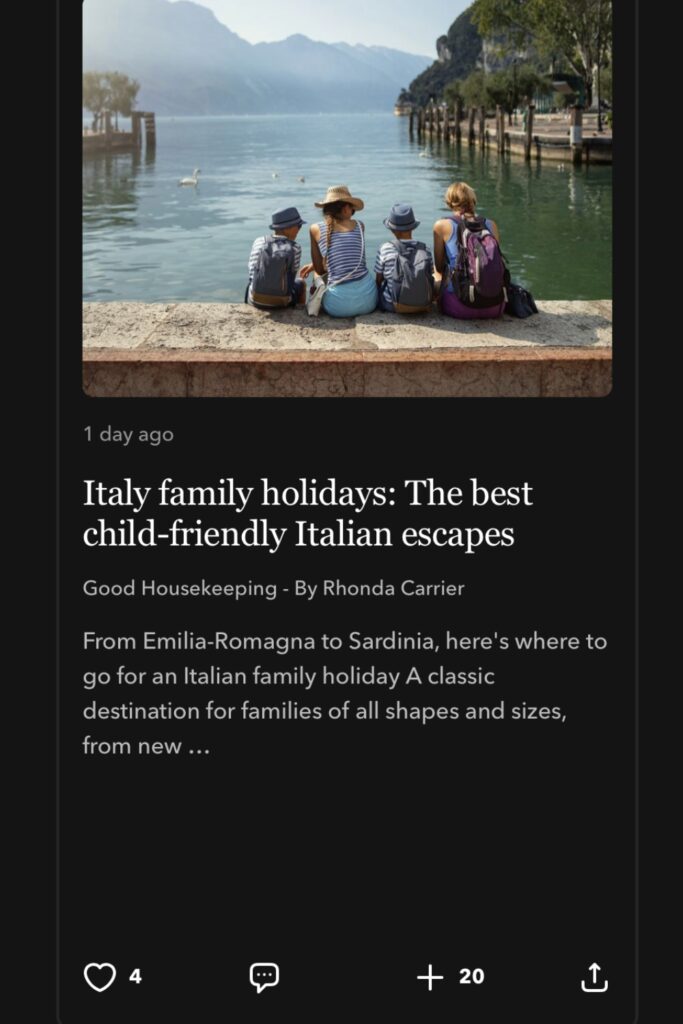
Interacting on Flipboard is great way to attract eyes on your profile, and then on your blog.
You can like the stories, comment on them and share them to other people easily, and it’s a great way to make the platform something that little bit more human.
Business-wise, interactions mean that people will look for the person who has commented, and maybe be interested in your magazines/storyboards, follow them and participate in making your posts viral.
Flipboard Hacks to Get Viral Blog Traffic: Create More Niche Magazines
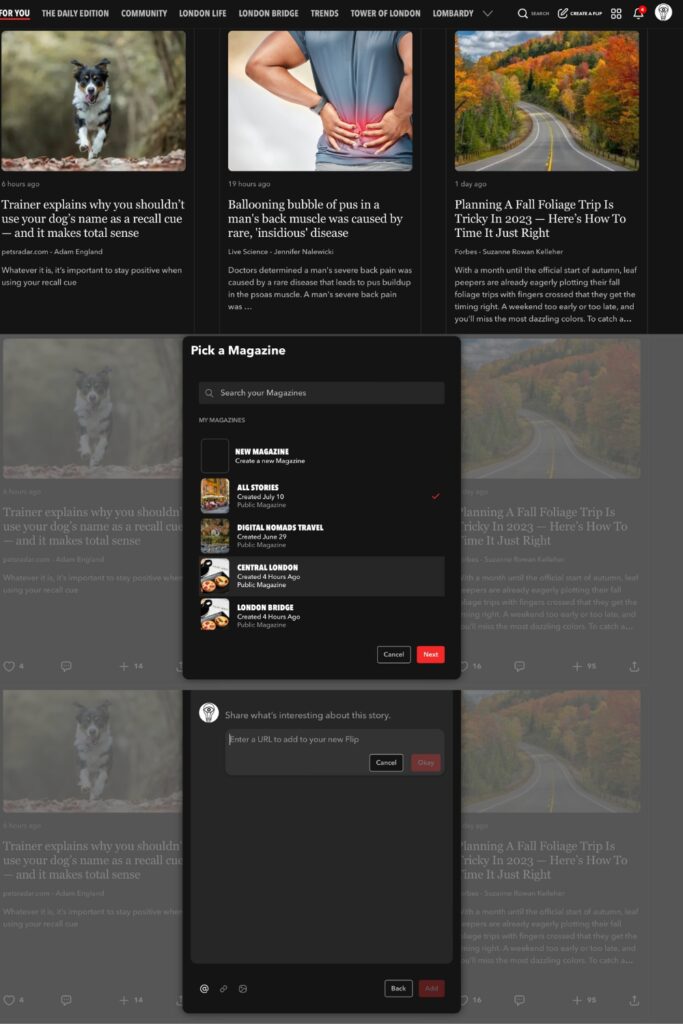
Once my account was set (I currently have a little over 1,000 followers on Flipboard), I started creating smaller niches for my magazines.
My first London Travel magazine, London Life, saw a few additions that would cater precisely to people’s needs.
That’s how the magazines London Food, Central London, London Bridge, and Visiting London were born.
Crossposting is definitely possible on Flipboard, and that’s a technique I use to draw massive traffic from Flipboard to my blog.
For instance, an article called Best Brunch in London Bridge would be flipped into all of these magazines.
The same goes for fashion, which you can break up into Shoes, Scarves, Outfits, etc.
How to Use Flipboard: Hacks to Get Viral Blog Traffic – Add Flipboard Buttons to Your Content

Another way to use Flipboard for bloggers is to add a Flipboard share button to your blog posts, which is available on the website.
You really have lots of choices, from follow buttons to banners and widgets that can all be added in different parts of your blog.
This helps people see that you publish on Flipboard, and them following you there means even more potential traffic without doing that much more.
How to Use Flipboard: Hacks to Get Viral Blog Traffic – Check Your Analytics
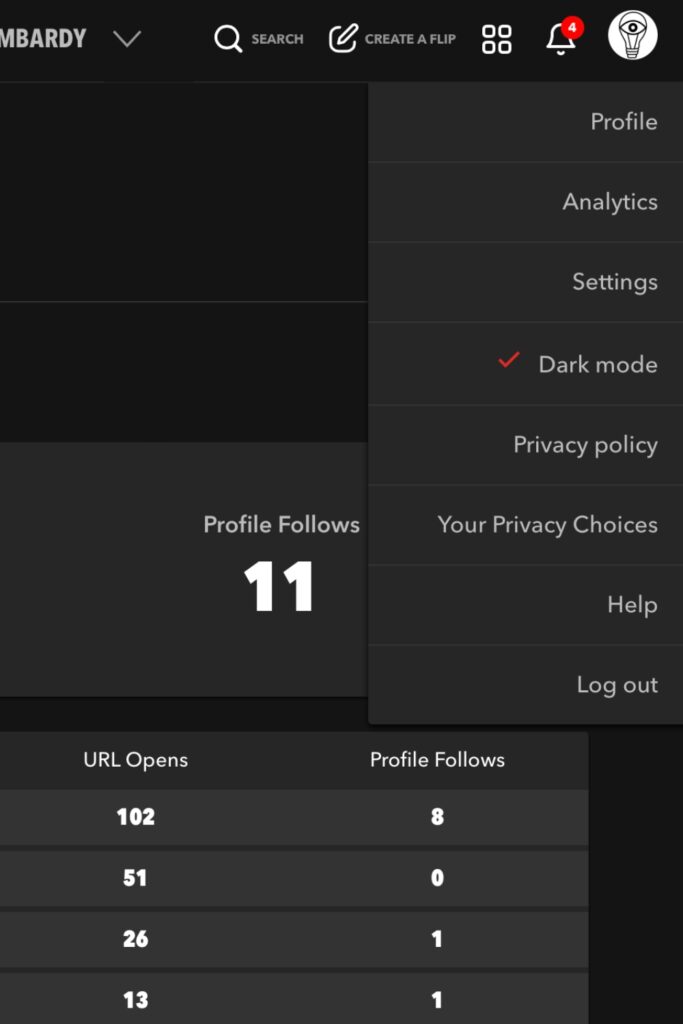
One of the best tips I can give you when using Flipboard for blogging is to check your analytics as precisely as you would on Google Analytics.
On the top right corner of the page, click on your profile picture and then on Analytics.
Since I am a Flipboard publisher, I have also created various Storyboards (more about how to become a Flipboard publisher in an upcoming post) for which I have analytics too.
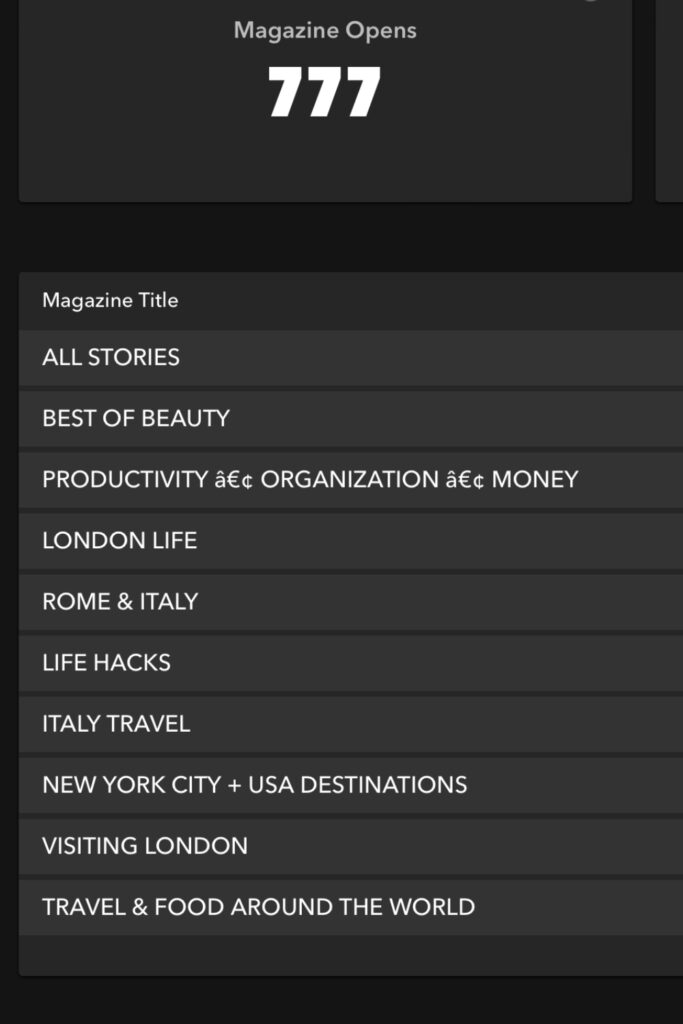
Flipboard is utterly transparent and will show you which magazine and storyboards work better, as in, which have the highest open rate.
But that’s not all.
When you click on a magazine, you can see exactly where the traffic was headed – both for your blog and other websites’ stories you’ve shared.
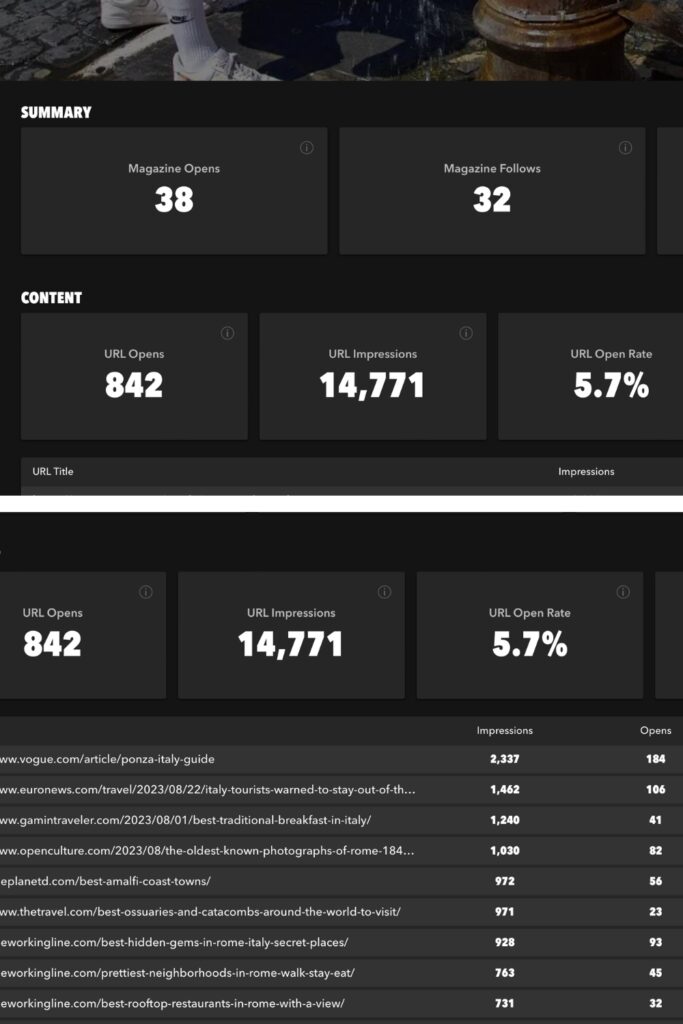
At first, you will see many different websites getting all the traffic you would really love to have, but that’s the beginning and it can change very quickly.
No envy here – what you need to do is analyze what were the posts with the highest open rate.
That gives you ideas for future blog posts without even having to do SEO research – to a certain extent.
One thing to note is that Flipboard analytics are only available on the Web version, not on the app.
How to Use Flipboard Results: Check Your Flipboard Traffic On Google Analytics
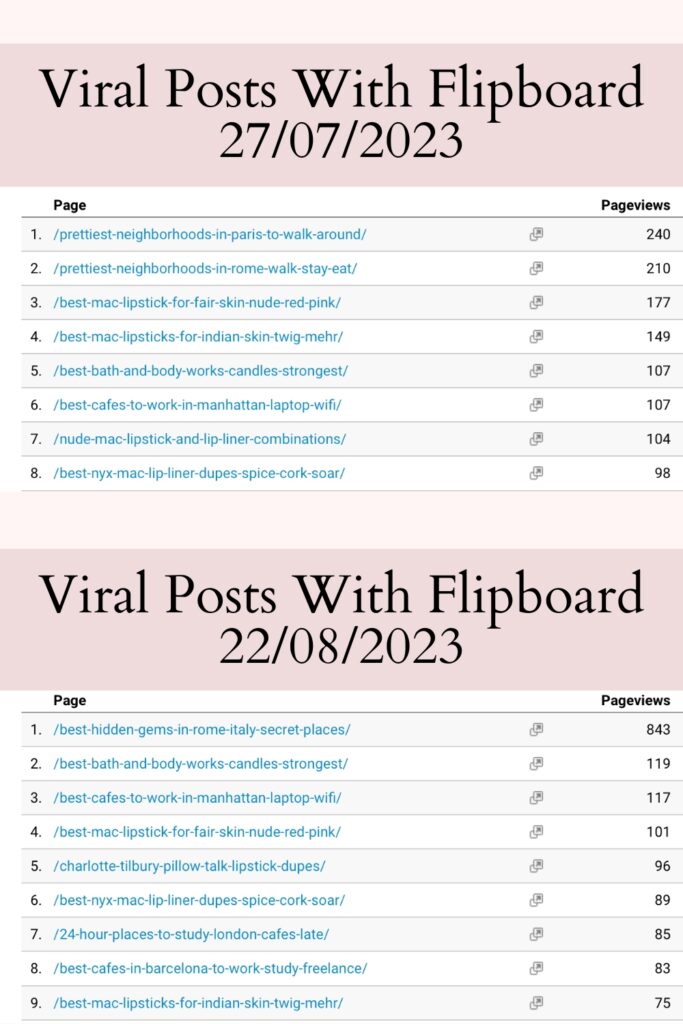
In this part of this guide to using Flipboard for bloggers, I want to show you a couple of results I am quite proud of.
Since June/July, I have been posting somewhat regularly on Flipboard.
Mid June saw me break my ankle roller skating, which means I definitely had the time to share and work on growing my account.
One of my first strong days with viral posts thanks to Flipboard was July 27, with Pretty Neighborhoods in Rome and Pretty Neighborhoods in Paris garnering over 400 page views in just one day. This surge in traffic was incredibly motivating and opened my eyes to the power of well-curated content reaching the right audience at the right time. It felt reminiscent of the temu viral 2000s digital camera era when creative expression began exploding online, and people discovered niche interests in vibrant, connected communities. The unexpected engagement inspired me to rethink my content strategy and focus on delivering more unique and visually appealing posts that resonate with readers around the globe.
I also had another post reach 1,100 page views in a day, and the most recent viral post I have had with Flipboard is Hidden Gems in Rome, with 843 page views in a day.
Something extremely important to note when it comes to the viral traffic brought about y using Flipboard for your blog is that the viral effect does not last.
The longest it will last is around a day and a half, so if you want to use Flipboard for high traffic while you’re building your blog’s domain authority, you’ll have to keep publishing.
More publishing, more traffic, more money.
Also – don’t flip something over your own blog post right after posting it, as it will give visibility to the last article you have flipped and you’ll lose the viral effect.
How to Use Flipboard: Google Analytics + Flipboard Medium April 1, 2023 to August 23, 2023
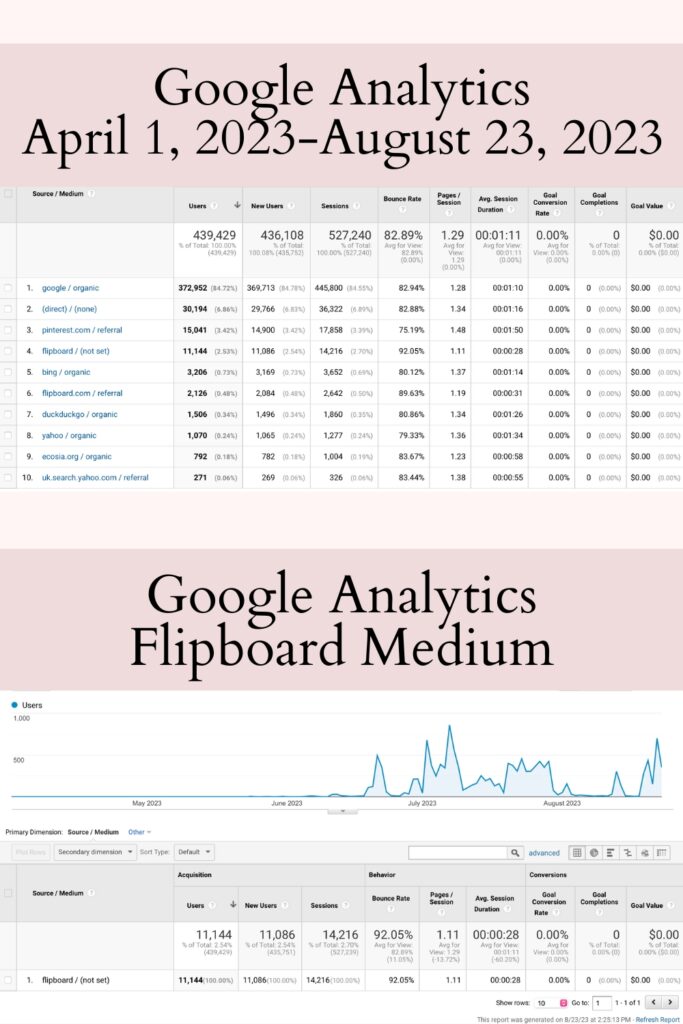
I actually started using Flipboard for my blog effectively in June 2023, and in Google Analytics, in Acquisition – All Traffic – Source/Medium, you can see the share of page views the platform brought me.
At the beginning, Flipboard is not recognized by Google Analytics and some views are to be found in Direct Traffic as well as Flipboard/Referral.
I currently estimate that in July, my strongest month so far with Flipboard, I have had about 20 to 25K page views with the platform.
With just a bit of dedication and elbow grease, I have seen great results and I am wondering what traffic will be like around Christmas.
9 Tried-and-Tested Flipboard Hacks to Get Viral Blog Traffic
Hopefully, you’ll have learned all there is to know about Flipboard for bloggers – it’s a very intuitive platform to use and incredible when it comes to getting viral traffic.
As with everything worthy in this world, it does take a little bit of time to build your Flipboard magazines and account.
However, from what you have seen on my Google Analytics of the past days/months, this is completely worth it.
Give it a go – you won’t be disappointed!
Until next time!
Other Productivity Posts
- The Best Productivity Tips When Working From Home
- How To Save Money For Travel as a Student
- How to Meal Prep Easily
- How to Save Money on Groceries
- The Best Tips for Study Motivation
- The Best Tips for Freelancers/Students and Life in a Hostel
- The Best Tips for Freelancer Productivity and Hostel Life
- Advantages and Disadvantages of Hostel Life
Other Travel Posts
- The Most Instagrammable Places in Paris
- The Most Instagrammable Places in Rome
- The Most Instagrammable Places in Edinburgh
- The Most Instagrammable Places in Istanbul
- The Most Instagrammable Places in NYC
- The Most Instagrammable Places in Lisbon
- The Most Instagrammable Cafes in Rome
- The Most Instagrammable Cafes in Paris
- The Most Instagrammable Cafes in Edinburgh
- The Most Instagrammable Cafes in Dubai
- The Most Instagrammable Cafes in NYC
- The Most Instagrammable Cafes in Istanbul
- The Most Colorful Cities in the World
- The Most Colorful Cities in Europe
- The Cutest Pink Places in the World
- The Best Digital Nomad Cities in Europe
Other London Posts
- The Best Pastel de Nata in London
- The Cutest Pink Cafes in London
- The Most Instagrammable Cafes in London
- The Best Hidden Gems in London
- The Most Unusual Places to Visit in London
- The Best Shopping Centers in London
- The Best Shops on Oxford Street
- The Most Secret Places in London
- The Best Free Rooftops in London
- The Best Free Views in London
- The Most Gorgeous Palaces in London